


An EV charger is not just a plug that delivers power. It is an internet-connected device that creates a variety of options for how to manage charging, based on what fits best for your site.
The right mix of access control and payment methods can make charging seamless for drivers and operationally simple for you, whether you are:
- Running chargers at an apartment building
- Managing a fleet depot
- Operating public stations on a highway
Below, we break down every access control and payment method available to operators and drivers today, and then analyze what kinds of sites they work best for so you can find the solution that fits your needs.
1. QR code → mobile web payment
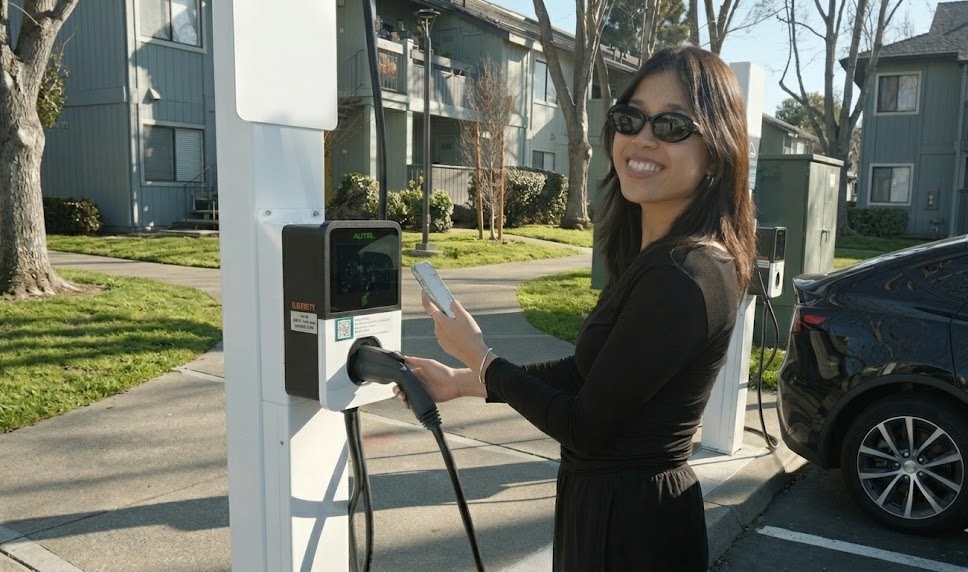
What it looks like: A QR code on the charger links to a mobile-optimized web page where drivers can pay with a credit card, with no app download required. They scan the code with their phone camera, see pricing information for that specific port, enter a phone number and payment details, and plug in their vehicle.
This approach is often the best tradeoff between convenience and cost. Operators avoid expensive hardware terminals while still offering a guest-friendly experience. Apple Pay and Google Pay are supported through the browser, making the process nearly as fast as tapping a physical card. The only requirement is a smartphone with a camera and connectivity.
Charging can also be limited to specific authorized users, or different pricing applied depending on customer groups, through Flipturn's payments and billing.
Best for: multifamily charging, public charging, any site that wants paid access without hardware cost
2. Credit card terminal on the charger
What it looks like: A payment terminal (like those made by Payter or Nayax) is physically mounted on the charging station. Drivers tap or insert their credit or debit card, the terminal authorizes a hold, and charging begins. When the session ends, the actual cost is captured and the remainder of the hold is released.
This is the closest analog to the gas station experience and the most intuitive option for drivers who do not want to download an app or create an account. Regulations in many jurisdictions now require credit card readers on public DC fast chargers. The main tradeoff is hardware cost, since terminals can add $500–2,000+ per charger.
Best for: public DC fast charging, highway corridors, any site where regulatory compliance requires a card reader.
3. Mobile app
What it looks like: Drivers download the your network's app, create an account, add a payment method, and start sessions directly from their phone. The app communicates with the backend, which sends a remote start command to the charger.
Apps offer the richest experience, including real-time session monitoring, charging history, receipts, push notifications, and saved payment methods for return visits. The tradeoff is upfront friction: first-time users need to download, register, and set up payment before they can start charging. Some platforms like Flipturn support both QR code web experience and in-app charging, allowing drivers to download the app only if it adds convenience for them.
Charging can also be limited to only specific authorized users, or different pricing applied depending on customer groups.
Best for: multifamily or workplace sites with repeat customers
4. RFID card
What it looks like: An RFID card or key fob is issued by a charging network or service provider. The driver taps it against a reader on the charger, the system verifies the card, and charging begins. It works the same way as a key card for a hotel room or office building.
RFID is fast, works without a smartphone, and can even function when the charger's internet connection is temporarily down, but comes with the downside of having to distribute them to drivers, and they often get switched or misplaced. We’ve seen many sites switch to a QR-code based approach to avoid the complexity of managing physical cards.
Best for: fleet depots, workplace charging, any setting where misplacing a card wouldn’t be a hassle
5. PIN code
What it looks like: Simple numeric PIN codes can control access and unlock specific pricing tiers. A property manager or fleet operator distributes 4-digit PINs to authorized users. The driver enters the PIN on the charger’s screen or on a web page accessed via QR code, and it grants access to a specific charging rate, which might be free, discounted, or at a tenant-specific tariff.
PINs are easy to distribute (text them to tenants or employees), easy to rotate, and require no hardware beyond what the charger already has. They provide access control without requiring individual accounts or physical tokens. The tradeoff is that PINs can be shared, so they offer access management rather than strong identity verification. For a deeper look at PIN-based access for Level 2 fleet charging, see our Level 2 PIN codes post.
Best for: multifamily properties for guest access, hotels, retail locations with customer-only charging, workplaces
6. Autocharge (vehicle ID)
What it looks like: When an EV is plugged in, the charger reads a unique identifier from the vehicle through the charging cable. This ID is sent to the backend and matched against a list of registered vehicles. If it matches, charging starts automatically with no card, app, or interaction needed.
The appeal is a truly hands-free experience: plug in and walk away. Autocharge works with many existing vehicles and chargers from manufacturers like Kempower, Autel, Tritium, and others. The limitation is that the vehicle identifiers used are not as secure as Plug & Charge's cryptographic approach, so autocharge is best suited for managed environments like fleet depots and workplaces where you know the vehicles.
Best for: fleet depots with a known set of vehicles
7. Plug & Charge
What it looks like: When you plug in a compatible vehicle, digital certificates are exchanged automatically over the charging cable. The charger verifies the vehicle's identity, determines the associated payment account, and starts charging, with zero driver interaction.
Unlike autocharge, Plug & Charge is cryptographically secure and backed by an international standard (ISO 15118). It supports roaming across networks and is being mandated in the EU starting in 2027.
An important caveat: not all vehicles support Plug & Charge yet. Support is growing but remains limited to newer models from select manufacturers.
Best for: public fast charging networks looking to offer a seamless driver experience as vehicle support expands.
8. Freevend (open access)
What it looks like: The simplest option, with no authentication at all. The charger is configured so that anyone can charge without identifying themselves. Charging starts automatically when a cable is connected, or the backend automatically sends a remote start command when it detects a vehicle has plugged in.
Freevend is ideal for sites where charging is offered as a free amenity, such as retail locations, employers, and municipalities running early adoption programs. It is zero friction for drivers but offers no usage tracking, no revenue, and no demand management. Most operators transition to some form of access control as utilization grows.
Best for: private fleet depots, early-stage multifamily deployments that want to avoid authorization complexity
9. Roaming
What it looks like: The driver uses a third-party app like Google Maps, their vehicle dashboard, or PlugShare to find and/or pay for charging.
Roaming isn't a payment method on its own. It's a layer that lets one credential work across many charging networks, the same way your phone plan lets you make calls on other carriers' towers. When a driver uses credentials from one provider at a different operator's charger, the two systems communicate behind the scenes to authorize the session and settle payment afterward. Flipturn supports OCPI 2.2.1 roaming for operators who need cross-network compatibility.
Enabling roaming allows your chargers become visible and accessible to a much larger pool of drivers without each one needing to create an account on your network.
Best for: public charging networks looking to maximize utilization by tapping into existing driver bases across other platforms and apps.
The bottom line
The variety of access and payment methods is a feature, not a bug. Because EV chargers are networked devices managed through cloud software, operators can mix and match approaches to fit their specific needs and change them over time as those needs evolve. A multifamily property might start with freevend, add PINs as adoption grows, and eventually layer on QR code payments for guest access. A public network might launch with app-only access and add credit card terminals and roaming as it scales.
The key insight: you're not choosing one method forever. The right charging management software lets you enable the combinations that work for your site today and adapt as the market and your needs change.
If you want to walk through which combination fits your site, book a call.
About Flipturn
Flipturn is the leading EV charging and energy management platform for businesses and fleets, helping organizations maximize charger uptime, process charging payments, and scale operations efficiently. Backed by leading investors including CRV and Accel, Flipturn serves Fortune 500 companies, commercial property owners, and major fleet operators across North America.
.jpeg)