
You've got EV chargers in the ground (or, you're about to). Now comes the harder part: making sure they actually work.
This guide is for operators who are either:
- Expanding EV charging across multiple properties or sites and need to manage it without adding headcount
- Running a fleet that depends on charger uptime, and tired of balancing demand charges against reliability
- Already using a solution like ChargePoint or Blink, and evaluating whether to switch
- New to EV charging software and not sure where to start
Below, we cover what EV charging management software (CMS) actually does, the six benefits that matter, and a clear framework for choosing the right provider depending on your use case.
What is EV charging management software?
Electric vehicle charging management software (CMS), sometimes called “EV charging management system," refers to platforms built to monitor and control EV chargers. The platform operates as the backbone of a complete EV charging solution: it communicates with the physical chargers, allows operators to collect data and send commands, and interacts directly with the driver as they plug in to charge.
Other ways a CMS might be referred to interchangeably:
- “Charging network”
- “Charging backend”
- “Charging system”
Key capabilities
In practice, a good CMS controls the charging experience of both the driver and the operator.
On the driver side, key capabilities include:
- User authentication
- Facilitating payments (saved credit card, Apple Pay, Google Pay, Paypal, etc.)
- Real-time view of fees and the vehicle’s state-of-charge
On the operator side:
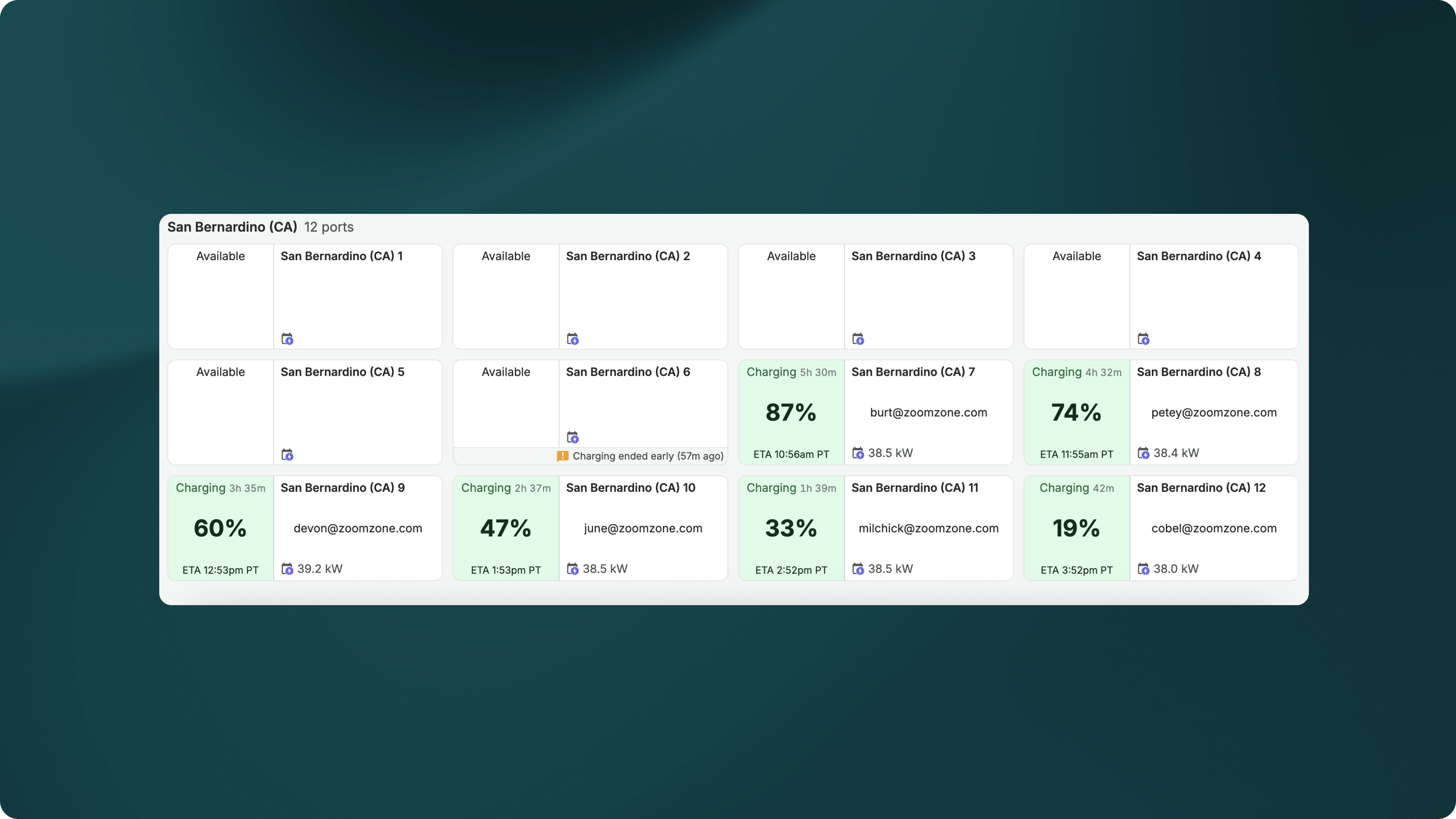
- Real-time view of charger status (working, down, occupied) and vehicle state-of-charge
- Alerts for charging failures / necessary maintenance
- Billing and payments configuration, such as setting driver fees
- Charger access management, such as restricting charger use to employees
- Ability to remote start, stop, and reset chargers
- EV charging load management: shifting of power consumption, such as reducing consumption during on-peak hours (also referred to as energy management or power management)
CMS providers vary in their capabilities, whether operators can configure these settings directly, and how easily they can do so.
Request a full walkthrough of Flipturn's CMS here.
Do all chargers have software?
Not all EV chargers support software. You’ll frequently hear chargers without software referred to as “non-networked” or “dumb” chargers.
These chargers operate standalone without internet connectivity and cannot be monitored or controlled remotely. You’ll usually see them in single-user scenarios where the driver does not pay for charging (for example, a private-use charger at home.)
Public or multi-user chargers are usually networked in order to facilitate payments and collect critical usage data for the operator.
Tip: networked chargers are also divided into (1) open ecosystem and (2) closed ecosystem chargers. Open ecosystem chargers can support most software, while closed ecosystem chargers are limited to a pre-determined platform. An example of closed ecosystem chargers are ChargePoint chargers, which can only be operated by ChargePoint's software.
Why use a CMS?
By giving the operator direct control of chargers and driver experience, CMS unlocks optimization in charging uptime and revenue. Practically, this breaks down into six key benefits: higher charger uptime, reduced operational overhead, electricity cost savings, revenue generation, improved driver experience, and data & reporting.
However, keep in mind that many of these features are not supported by all CMS providers, so some benefits are limited depending on your vendor. The examples and images below are from Flipturn’s CMS.
1. Higher charger uptime
A CMS allows operators to monitor chargers and identify issues, which in turn leads to issues being resolved faster.
Different platforms may vary in the granularity / time-frame of data collection (some collect data in real time, others collect every hour / every few hours) and quality of the data reporting.
Flipturn’s CMS optimizes charger uptime via automated alerts, thorough reporting, and concise daily email summaries of charging activity.
2. Reduced operational overhead
Similar to how a CMS improves charger uptime, it also makes maintenance lower-lift by centralizing monitoring and simplifying reporting across usage and billing. One team can realistically manage hundreds of chargers thanks to reduced admin time, reduced training time, and oversight improvements.
3. Electricity cost savings
Electricity costs break down into two components: power usage and demand charges. A CMS helps you save on both with energy management.
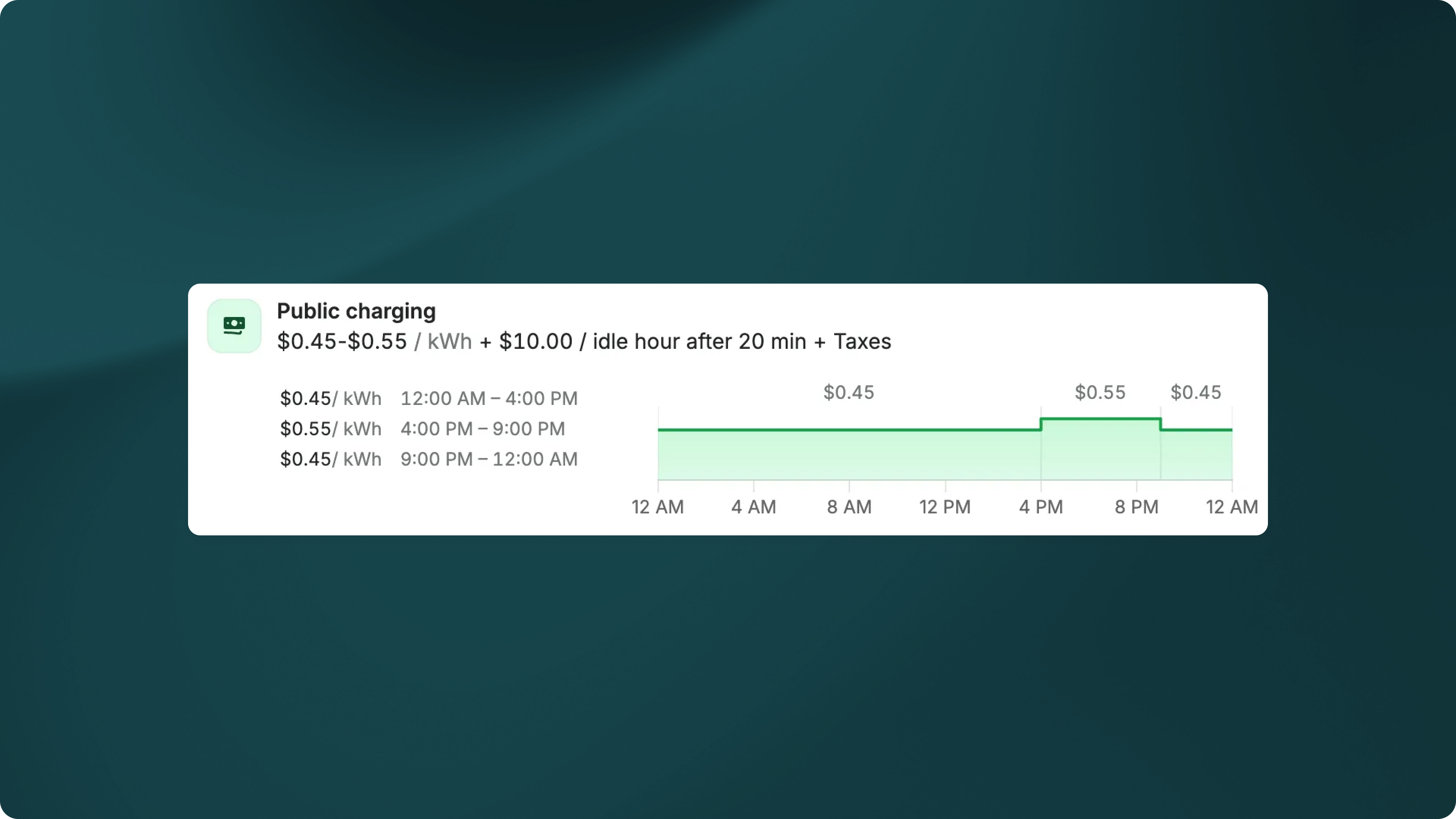
- Savings in power usage: A CMS with load management capabilities (i.e. the ability to control and shift power usage) can shift charging to off-peak times, reducing the cost of consumption. Furthermore, if your CMS allows you to configure time-of-use fees (i.e. fees that vary by the hour), you can set higher fees during peak hours to disincentivize drivers from charging (while it’s most expensive for you).
- Savings in demand charges: Load management can also significantly reduce demand charges by spreading charging out over time (ex. making each charger deliver 5 kW instead of 10 kW when all the chargers are being used at once, to keep total consumption under a certain threshold)
4. Revenue generation
A good CMS lets you configure pricing to ensure that driver charging is revenue-positive.
For example, you can set a margin above whatever time-of-use electricity costs are, so you make back money on each charge. Flipturn’s platform automatically pulls time-of-use electricity costs so you don’t have to manually update prices, ever.
There are several pricing structures operators can use, including:
- Per kWh (charging by electricity usage)
- Per minute (charging by time spent charging)
- Session fees (charging per session)
- Idle fees (charging for extra time spent occupying the charger without charging)
Idle fees are a useful tool to make sure users don’t hog chargers. For example, you can set up your pricing so users get charged $10 per hour plugged in after their vehicle is done charging. You can also give drivers a “grace period” which gives them time to return to their vehicle and unplug, before they start getting charged.
Putting together per kWh pricing + idle fees, an example pricing structure might be:
- $0.45 / kWh + $10.00 / idle hour after 20 minutes
Another example with time-of-use pricing + idle fees:
- 12:00 AM — 4:00 PM: $0.45 / kWh + $10.00 / idle hour after 20 min
- 4:00 PM — 9:00 PM: $0.55 / kWh + $10.00 / idle hour after 20 min
- 9:00 PM — 12:00 AM: $0.45 / kWh + $10.00 / idle hour after 20 min
5. Improved driver experience
Non-networked chargers work for residential, single-user chargers because the driver doesn’t need to know how much it’s going to cost. They’re not paying themselves to charge.
However, when the operator and the driver are different people, charging becomes a service. And for services, user experience is crucial!
A CMS enables the operator to dynamically provide information to the driver: pricing, fees, charging time, state-of-charge, etc. It’s an easy way to make sure the driver knows what they’re in for (and avoid angry customer support calls in which the driver does not know what’s going on, you don’t know what’s going on, and no one knows how to fix it.)
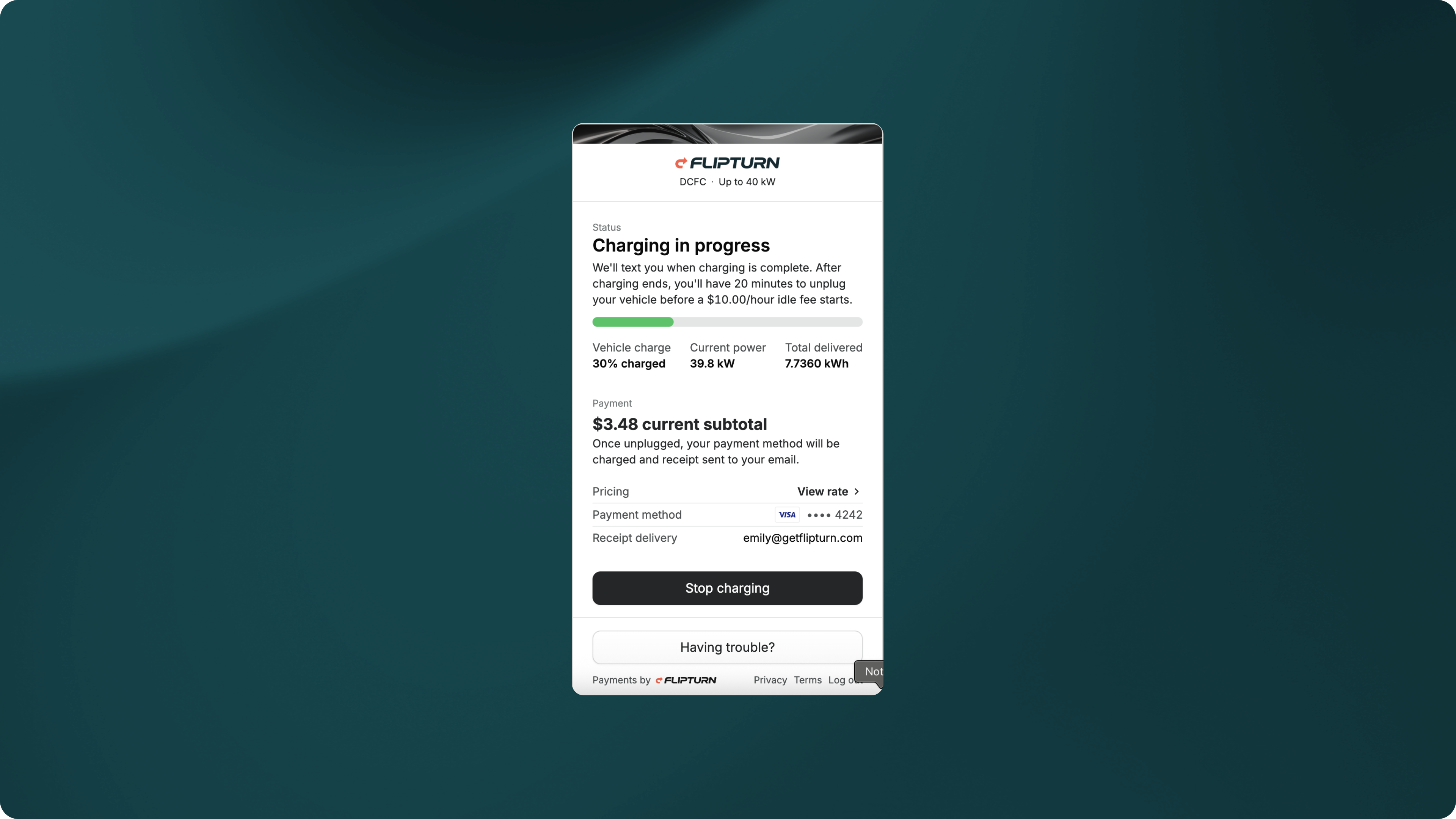
The driver interface is also a great place for branding. If you’re a charge point operator (CPO) and want to improve brand recognition so drivers come back to your stations to charge, the driver interface is an easy place to make sure they see your logo.
Tip: the quality of driver experience is where many CMS providers differ. We’ve all seen charging apps with poor user interface: buttons that don’t work, buffering payment portals, unclear pricing… the list goes on. This is an important way to evaluate the good and not-so-great CMS options out there.
6. In-depth data and reporting
Most of the benefits above are only possible because a CMS enables data collection from chargers and reporting on their activity. Examples of collected data include:
- Charger uptime %
- Utilization rate
- Revenue per charger
- Energy cost per session
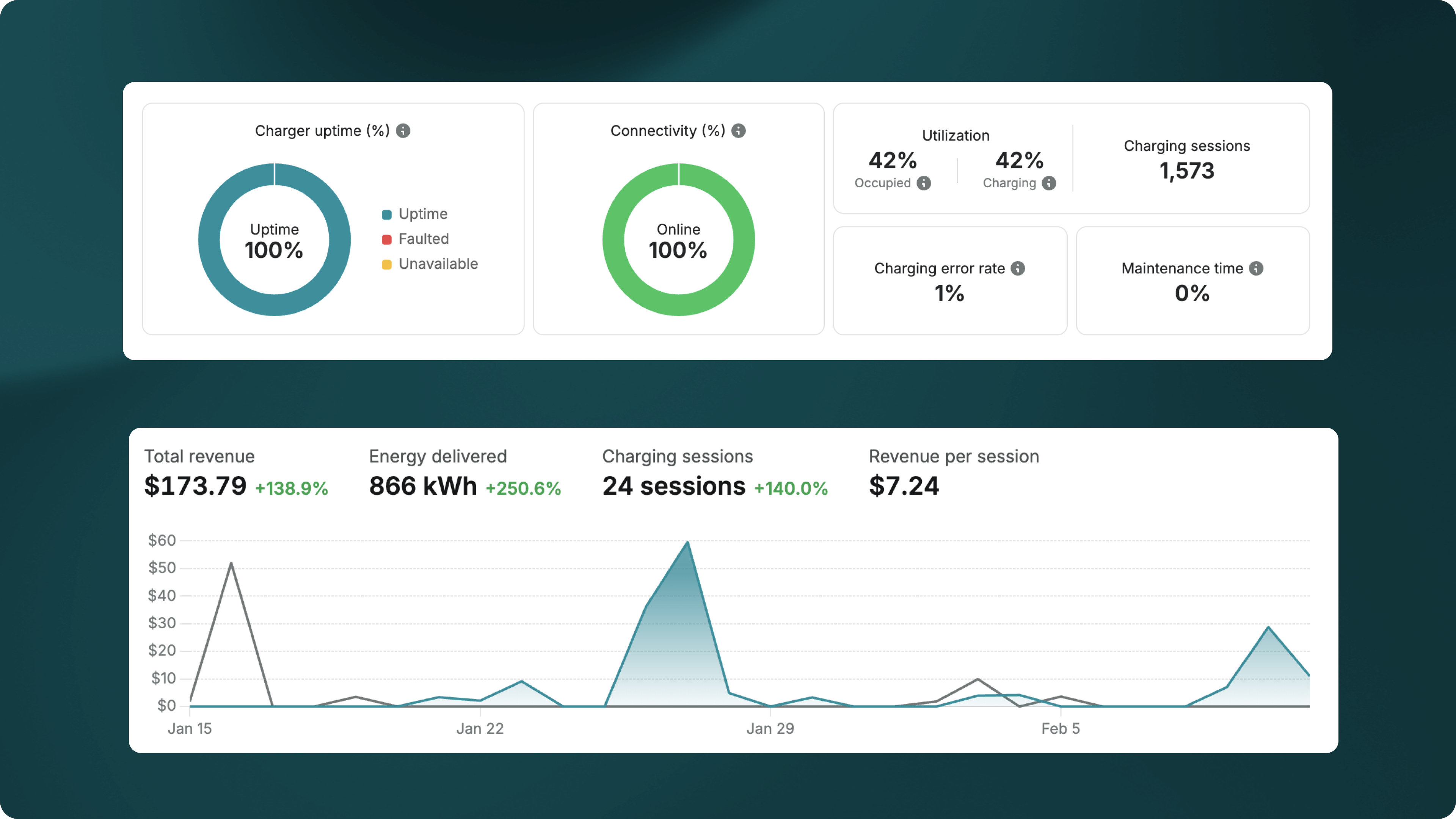
Data collection becomes really useful for retrospective reporting and proactive maintenance.
Retrospective reporting can help operators figure out:
- If chargers are being over / under-utilized, and which sites need more chargers
- Which chargers experience the most issues, what kinds of issues are most frequent, and if there are any trends correlating with hardware or location
- How much revenue chargers have generated
- Emissions savings (for sustainability reporting + LCFS)
- Where load management can be further optimized
Proactive maintenance, on the other hand, is using historical data to analyze and resolve issues before they impact operations. An example would be sending an alert out to a technician to double-check a charger’s connectivity because it had lost connection with the platform for a couple minutes while unoccupied; the technician then fixes the issue before a driver tries to plug in (unsuccessfully.)
Tip: proactive maintenance is a newer capability among CMS providers — many providers claiming to do it are probably extrapolating from their retrospective reporting features!
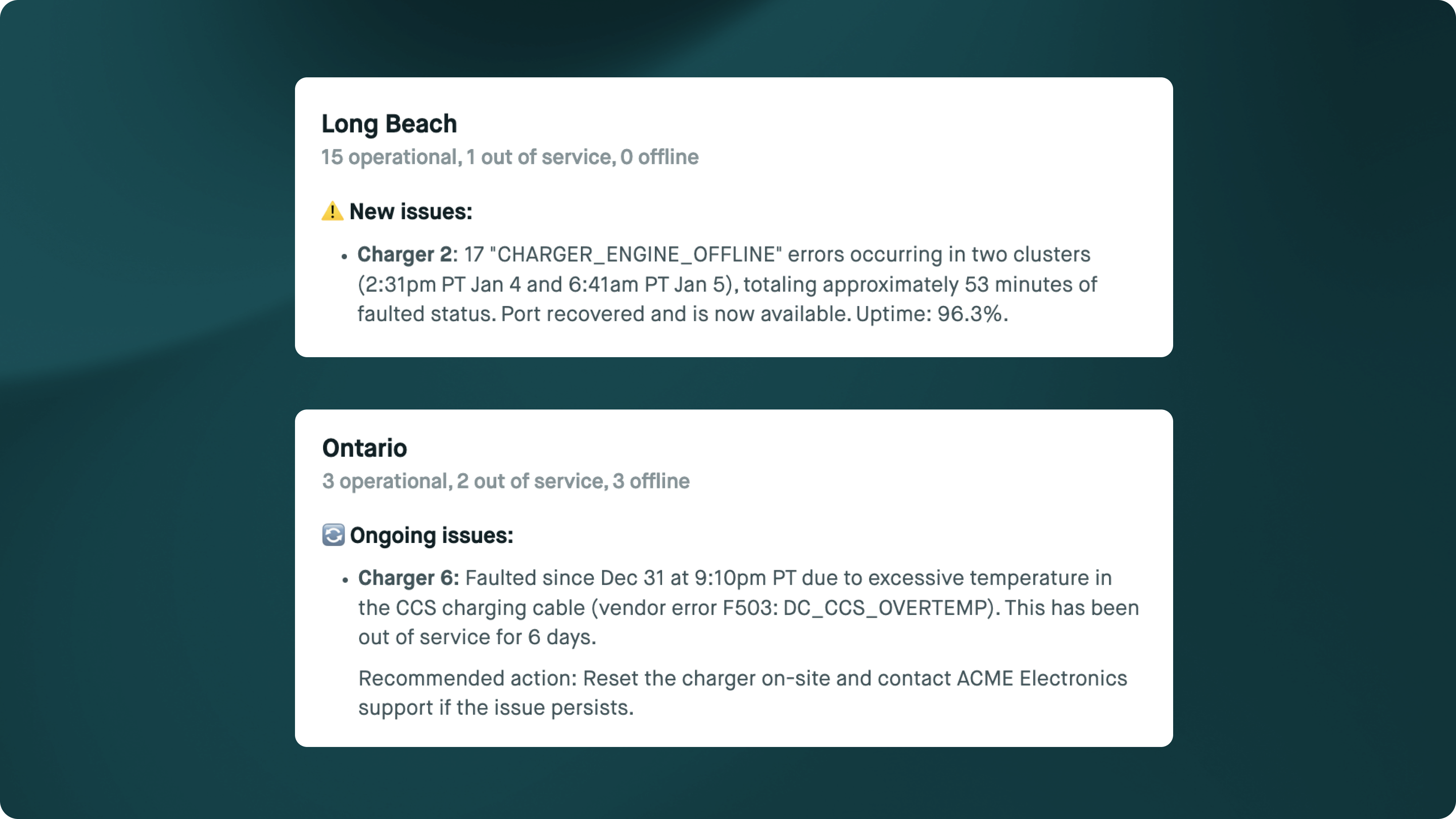
An example of how this looks in practice is Flipturn’s new AI charging operations agent, which specializes in detecting and tracking issues over time across sites. The AI agent sends out a daily email updates with clear next action steps:
Is a CMS necessary?
As discussed so far, it may seem like a CMS is an optional component of EV charging. While it can be optional for certain use cases (i.e. single-resident charging), the vast majority of charging setups require CMS to support baseline function.
If charger uptime, revenue generation, minimizing electricity cost, or positive driver experience are crucial to your business operations, then a CMS is necessary. Without it, chargers cannot be monitored and their behavior cannot be controlled.
If you’d like an assessment as to whether or not a CMS is necessary for your operations, book a consultation here.
For larger-scale energy management or microgrid use cases, read more about our EV load management device / onsite controller here.
Considerations when implementing
Before using a CMS, there are several things operators should consider to ensure successful deployment: charger compatibility, network availability, operational responsibility, integration capabilities, and security.
1. Charger compatibility
Not all CMS platforms work with all chargers. Before purchasing any particular hardware or CMS, ensure that the two are compatible — in particular, check that your chargers are Open Charge Point Protocol (OCPP)-compliant and supported by the CMS provider.
If you already have chargers and are looking to replace a previous CMS (e.g. for Shell Recharge or Enel X users, both CMS providers ended service), you may also need to check if re-networking to a different CMS is possible.
Generally, it’s best practice to use OCPP-compliant hardware: it reduces risk of vendor lock-in, or worse, being stranded with chargers that could only operate on a CMS that’s gone out of business.
Want to learn if re-networking is possible for your chargers? Contact one of our EV charging experts.
2. Network availability
To successfully communicate with a CMS, chargers need connectivity. Networking design becomes especially important in areas with poor WiFi / cellular connectivity, such as underground parking or remote depots.
Operators have many options, from cellular to WiFi to Ethernet. Regardless of which you choose, it’s important to have a reliable solution in place before deploying a CMS, as good connectivity is crucial to uptime and data accuracy.
For offline load management use cases, read more about our onsite controller here.
3. Operational responsibility
Different CMS providers offer different levels of support and operational models; some have full in-house monitoring teams, as well as technicians and electricians that are sent to your site to resolve issues. Some common operating models are:
- Operator-managed: the operator manages the chargers
- CMS + managed monitoring: the CMS provider helps monitor the chargers, but may hand off actual maintenance to the operator
- Full third-party operations: the CMS provider handles monitoring, maintenance, and all other facets of charging operations. Or, the CMS may outsource this to another service provider.
It’s crucial to decide which model works best with your operations (so you get a contract that you actually want to pay for). If you’re planning on having any stake in operations, establish who owns monitoring and maintenance to prevent gaps / failures post-deployment.
Make sure to know who’s responsible for going on-site when a charger breaks.
4. Integrations with existing systems
As an operator, you likely have several other systems that need to interact with your CMS. Some frequent integration needs include:
- Finance (QuickBooks, SAP)
- Sustainability reporting (Persefoni, Microsoft Sustainability Manager)
- Fleet telematics (Geotab, Samsara)
- Property management / real estate software (Yardi, RealPage, AppFolio)
While CMS providers vary in how well they can integrate with your existing tools, at a bare minimum, they should support data exports of charger usage data, uptime, and revenue (usually through CSV files or APIs.)
Key questions to ask: What integrations do you support today? Is there an API available to support custom / future integrations?
5. Security and compliance
A CMS interacts with physical charging infrastructure, payments, driver data, and operator data, making security paramount. Any viable CMS provider should comply with industry standards and data privacy regulations. Operators should understand how driver data is stored, secured, accessed, and how long it’s retained.
Aside from data, charger security is also important for reliability. CMS platforms that support OCPP security profiles can protect chargers from remote tampering and misuse.
How long does implementation take?
Time to go-live with a CMS varies by use case, but it’s generally straightforward. Configuring the CMS itself is very quick; compatibility and hardware usually take more time to set up.
For existing chargers, implementation timeline depends on whether chargers need to be re-networked from a previous CMS. Re-networking takes days to weeks and can involve:
- Checking charger + firmware compatibility
- Updating charger firmware
- Commissioning / configuration
- Setting up reliable network connectivity
For new EV charger installations, selection of a CMS should go hand-in-hand with hardware selection / installation, with the operator making sure the two are compatible. Implementation time is mainly taken up by the physical procurement and install of chargers (weeks to months). Once chargers are on and connected to the internet, a CMS can be configured in days.
For commercial property owners, navigate to our full guide on commercial EV charger installation.
How to choose a provider
The right CMS should be able to answer these questions for you:
- Reliability — does this CMS provide reliable charging? Do they have an uptime guarantee?
- Ease-of-use — is this platform easy to use and configure? How well does it integrate into my systems today?
- Customer support — how responsive is their customer support? Can they fix issues quickly?
- Open vs. closed ecosystem — does this CMS support my hardware today? Will it in the future? What happens to my chargers if the CMS goes out of business?
- Scalability — will this CMS still support my operations as my business grows? Would it work if I had 10x the chargers? Can it manage multiple sites?
- Cost — how is this CMS priced (monthly, annually, perpetual license)? How expensive is it relative to other providers?
For competitive analysis, it’s important to do your own research and understand how each CMS provider positions themselves against peers in your industry (fleet vs. multifamily vs. public charging).
As a starting point, our team at Flipturn has compared Flipturn vs. ChargePoint and Flipturn vs. Blink for multifamily properties. Use this framework as a starting point to compare other solutions, but if you have your own criteria / north star when it comes to EV charging, let that guide your vendor evaluation.
Have a particular pain point you haven’t seen solved by any CMS? We’d love to chat!
Flipturn CMS by use case
Have a particular use case in mind? Explore Flipturn’s CMS features by industry:
And you can read more about our new AI charging operations agent here:
- Introducing Flipturn's AI charging operations agent
- 6 AI challenges Flipturn addressed to build an AI agent for EV charging operators
Real-world case studies
For a better sense of how a CMS like Flipturn works in practice to improve charging operations, read more in our customer case studies below: