

OCPP is an open communication protocol used by EV chargers to communicate with a charger management system (CMS) like Flipturn. The vast majority of commercially available chargers today support OCPP, allowing fleets to select from many different charger and CMS brands.
What is an OCPP status?
One of the most important messages sent by a charger via OCPP is the "StatusNotification", or status for short. It represents the current state of each port on the charger. If the charger has multiple ports, each port can have an independent status. For example, Port 1 could be Charging while Port 2 is Available.
The status is reported by the charger in real time whenever it changes, so the CMS has an up-to-date view of what is currently happening with the charger. OCPP status messages can also include additional data like error codes.
What are all of the different OCPP statuses and what do they mean?
There are 9 possible statuses in the OCPP specification. Here's what each one means:
- Available: No vehicle is plugged in to the port, and it's available for a new vehicle to plug in.
- Charging: The port is currently charging a vehicle.
- Preparing: The port is no longer available for a new vehicle to plug in, but charging has not started yet. There is often a delay between when a vehicle plugs in and when charging starts: this could be due to the charger getting ready, communication between the vehicle and charger, or waiting for payment or authorization.
- Finishing: Charging has ended but the vehicle is still plugged in, so the port is not yet available for another vehicle to use.
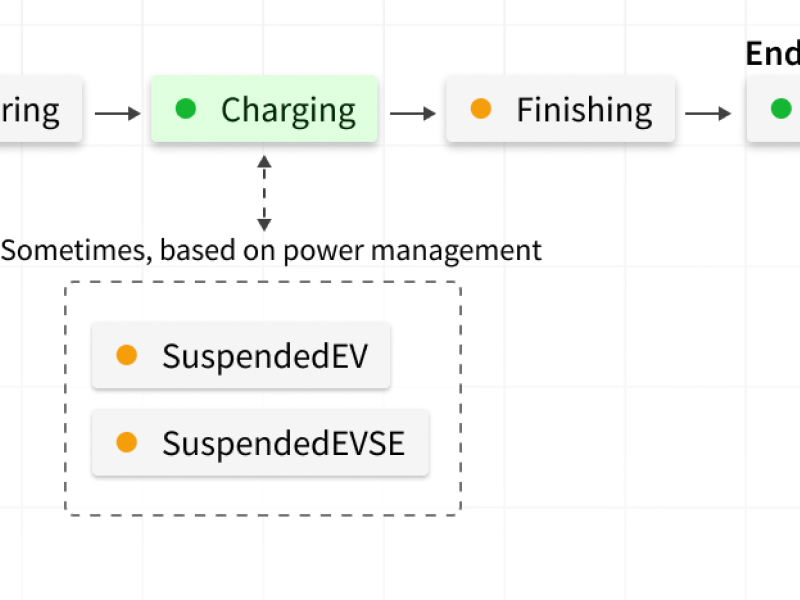
- SuspendedEVSE: A vehicle is plugged into the port, but the charger is not delivering any power due to a charger-related reason, for example charger power management settings or lack of authorization.
- SuspendedEV: A vehicle is plugged into the port, but the vehicle is not accepting power from the charger. This happens when the vehicle is fully charged, or when someone has configured the vehicle to stop charging at a certain threshold.
- Reserved: The port is currently reserved for a specific user or vehicle, so it will refuse to charge other users or vehicles.
- Unavailable: The port is not available for charging at this time. This status is often used to indicate the charger is awaiting maintenance or about to restart.
- Faulted: The port is currently experiencing a fault or issue. Depending on the charger, this can come up in various situations. Sometimes, it means that the charger won't be able to charge, but not always. If the faulted status includes a more specific error code, that may include more information about what is happening. In some cases, the fault can be resolved by resetting the charger, or unplugging the vehicle and plugging it back in.
The lifecycle of a charging session

Most charging sessions follow the pattern below:
- Available. The port always begins in the available status when unoccupied.
- Preparing. When the vehicle is plugged in, the port transitions to preparing. During this time, the charger may generally prepare, communicate with the vehicle, or accept authorization via an app or RFID card.
- Charging. Once the charger and vehicle are ready, charging starts. At this point, the charger is delivering power to the vehicle.
- (Sometimes) SuspendedEV or SuspendedEVSE. The charger or the vehicle may request that charging is suspended depending on various power management settings.
- Finishing. Once either the charger or the vehicle decides that charging is completed, the port transitions into this status.
- Available. Once the vehicle is unplugged from the port, it returns to the available status.
While this seems straightforward, different charger manufacturers implement OCPP in slightly different ways. For example, some report "Preparing" instead of "Finishing" after charging. Flipturn's charger monitoring handles these edge cases under the hood, but it helps to understand that different chargers may send different statuses in the same scenarios.
See OCPP visibility in your charging operations
If you want full OCPP message log access and automated handling of vendor-specific status quirks across your charging network, book a demo.
About Flipturn
Flipturn is the unified control center for EV charging operations, built for properties, businesses, and fleets. Whether you're managing a private depot or a public charging site, Flipturn helps you stay online, cut costs, and keep EV operations running smoothly. Control energy usage, manage access, accept payments, and remotely monitor operations across your chargers and vehicles, all in one place.

.jpeg)